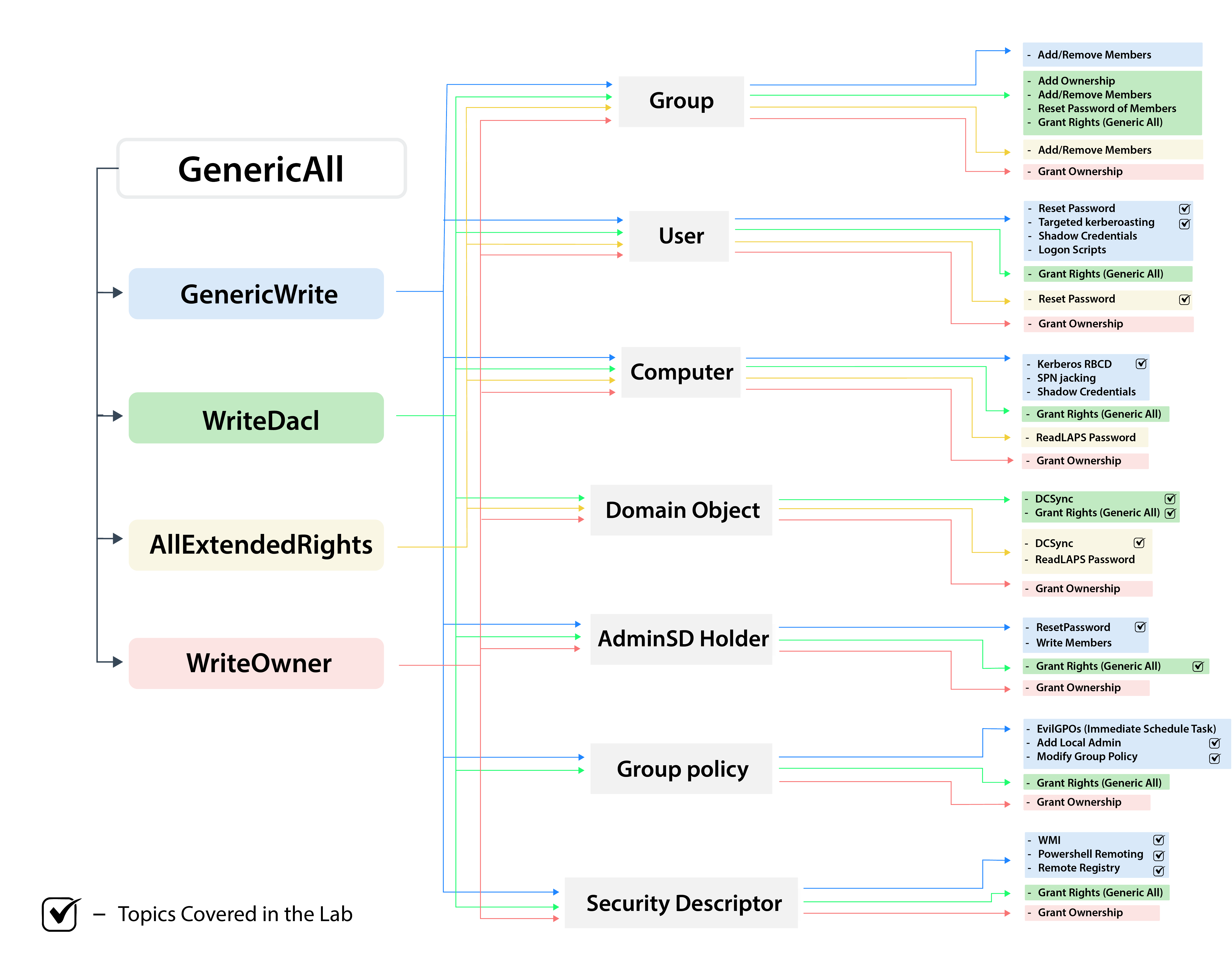
ACLs (Access Control Lists)
Active Directory uses an Access Control Model to govern resource access. Understanding the relationship between Access Tokens (process identity) and Security Descriptors (object permissions) is key to finding escalation paths. Core Concepts
-
ACE (Access Control Entry): An individual permission within an ACL. It defines "Who" can do "What".
-
DACL (Discretionary ACL): Defines permissions for users/groups on an object. (Our primary target).
-
SACL (System ACL): Used for logging and auditing access (Success/Failure).
# Get ACLs for a specific object (Resolving GUIDs is essential for readability)
Get-DomainObjectAcl -SamAccountName <target-user> -ResolveGUIDs

# See who has permissions for a specific GPO
Get-DomainObjectAcl -Identity "Nombre_De_La_GPO" -ResolveGUIDs

# Get all ACLs where a specific user (e.g., studentx) has "interesting" permissions.
# Identifies what objects you can control with your current account.
Find-InterestingDomainAcl -ResolveGUIDs | ?{$_.IdentityReferenceName -match "studentx"}

# Get all ACLs where the "RDPUsers" group has "interesting" permissions.
# Useful to check if this group can manage other users (e.g., ForceChangePassword).
Find-InterestingDomainAcl -ResolveGUIDs | ?{$_.IdentityReferenceName -match "RDPUsers"}

# Search for ACLs using a specific LDAP prefix
Get-DomainObjectAcl -SearchBase "LDAP://CN=Domain Admins,CN=Users,DC=moneycorp,DC=local" -ResolveGUIDs

# Find "Interesting" ACLs (Filters out default/noise permissions)
# This is the "Golden Command" for quick wins
Find-InterestingDomainAcl -ResolveGUIDs

# Check permissions for a specific file or network path (e.g., SYSVOL)
Get-PathAcl -Path "\\<dc-ip>\sysvol"
# Enumerate ACLs natively (Note: Does NOT resolve GUIDs, harder to read)
(Get-Acl "AD:\CN=Administrator,CN=Users,DC=moneycorp,DC=local").Access
In Active Directory, permissions are stored as GUIDs (long strings of numbers and letters). If you don't use -ResolveGUIDs, you'll see something like 00000005-0000-0000-c000-000000000046 instead of GenericWrite. Always include it to save time!
Privilege Abuse Reference
| ActiveDirectoryRights | Description & Impact | Attack Vector |
|---|---|---|
| GenericAll | Full Control: Complete authority over the object. | Reset passwords, modify group membership, or edit any attribute. |
| GenericWrite | Write Access: Ability to update and modify any non-protected attribute. | Update scriptPath (Logon Scripts) or msDS-AllowedToDelegateTo. |
| WriteOwner | Take Ownership: Allows you to become the owner of the object. | Change owner to yourself, then grant yourself GenericAll. |
| WriteDACL | Permission Control: Ability to modify the object's security descriptor. | Give your user/group Full Control over the target object. |
| AllExtendedRights | Extended Privileges: Grants all extended rights (e.g., password resets). | Add members to a sensitive group or perform a forced password change. |
| ForceChangePassword | Password Reset: Direct right to change a user's password. | Reset the target's password without knowing the current one. |
| Self (AddSelf) | Self-Membership: Right to add your own account to a group. | Add your compromised user directly into a high-privileged group. |